Cargo API Integration: Your Shipments, Inside Your Own System
Your shipments, inside your own system
You do not need a second website to track containers. SeaVantage sends the tracking data to the system your team already uses — your ERP, your portal, your spreadsheet replacement. This page shows how, using one sample shipment.
Step 1 — SeaVantage tracks it: carrier, vessel and port data, kept up to date.
Step 2 — The API carries it: a standing connection between our system and yours.
Step 3 — Your team sees it: route, vessel, ETA and events — on your own screens.
What is an API?
It is a pipe between two systems. SeaVantage puts shipment data in one end. Your system takes it out the other end and shows it your way. The data travels as a text file called JSON. It looks like code. It is just labelled facts — as the demo below shows.
That pipe can work two ways. Option A moves the data itself into your system, so your screens show it your way. Option B shows our tracking page inside your system, with no data work at all. Here is Option A.
1
Option A — the API: our data, your screens
On the left is the data SeaVantage sends for one shipment — Master B/L 276594731, Maersk, Busan to Ho Chi Minh City. On the right is a dummy customer system: a made-up manufacturer’s inbound board. Tap any block of data on the left. The matching part of their screen lights up. That is the whole idea of an API.
Live demo — one shipment, two viewsSample data · dummy customer system
The shipment ID."mblNo": "276594731" is the Master B/L number. On their screen it is simply the heading of the shipment card — the number their team searches by.
What SeaVantage sends the JSON file
{
}
Shortened for readability. The full file carries every port call, terminal and event for all six containers — your system picks the parts it wants.
What their team sees their own system
Meridian Manufacturing — Inbound BoardDummy system
Shipment
276594731Maersk · Master B/LBefore departure
Route
BusanBusan New Port Terminal→Transshipment · Nansha→Ho Chi Minh CityCat Lai Terminal
Departure · Busan
Oct 4, 01:00
Carrier ETD
Arrival · Ho Chi Minh City
Oct 9, 06:00
Carrier ETA
SeaVantage predicted arrival (PTA)
Oct 6, 23:11
An early signal that sits next to the carrier ETA — so planners can flag a possible slip and check, not a replacement for the carrier date.
Vessel
NORDLEOPARD · Voyage 640W · IMO 9626261 Second leg from Nansha: ERASMUS EFFORT, voyage 641S.
This manufacturer chose route, dates, vessel, containers and events. Your system shows only the fields your team wants — in your layout, your colours, your language.
2
Option B — screen embedding: our page, inside your system
No data work at all. Your team stays in your system. They click a shipment number, and the actual SeaVantage tracking screen opens right there — shipment milestones on the left, the route map on the right, for the same sample shipment as the API demo above. Try it: click the shipment number below.
Live demo — click a shipment numberDummy system · the pop-up shows the actual SeaVantage tracking screen
Meridian Manufacturing — Inbound ShipmentsDummy system
Shipment (Master B/L)
Route
Carrier ETA
Status
Click me
Busan → Ho Chi Minh City
Oct 9, 06:00
Before departure
274881205
Shanghai → Busan
Oct 12, 14:30
Booked
269310477
Ho Chi Minh City → Incheon
Oct 2, 09:15
Arrived
Tap me
Busan → Ho Chi Minh City
Carrier ETA Oct 9, 06:00 · Before departure
274881205
Shanghai → Busan
Carrier ETA Oct 12, 14:30 · Booked
269310477
Ho Chi Minh City → Incheon
Carrier ETA Oct 2, 09:15 · Arrived
That click is the whole feature. The list is theirs. The tracking page that opens is ours, shown inside their system. Their team never opens a second tool, and there is nothing for them to build beyond adding the link.
Two ways in. Same data.
Most customers start with one and add the other later. Neither needs your team to change how it works today.
Option A
API — the data pipe
SeaVantage sends the raw facts. Your system shows them in your own design, next to your own data — purchase orders, production plans, customer orders.
Full control over what is shown and where
Data can drive alerts, reports and planning rules
Your developer connects it once; updates then flow on their own
Best when: you have a system your team lives in, and a developer who can spend a short time connecting it.
Option B
Screen embedding — the window
Your system links each shipment number to the ready-made SeaVantage tracking page. One click opens the full picture — no data handling on your side.
Nothing to build beyond the link itself
Full tracking detail: route, milestones, all containers
Works from any screen that can hold a link — ERP, portal, intranet
Best when: you want tracking inside your system fast, with no development work.
What happens next
Three steps. Only step 2 involves a developer, and SeaVantage supports them.
STEP 1
You pick the shipments
Tell us the B/L or container numbers to track — or register them in Cargo Insight. That is the list the data covers.
STEP 2
Your developer connects once
We give them access and the technical guide. They connect your system to the API, or add the embedding link to your shipment numbers.
STEP 3
Your team just looks
Dates, vessels and events stay current on your own screens. No logins to chase, no carrier websites to check by hand.
SeaVantage Cargo Insight
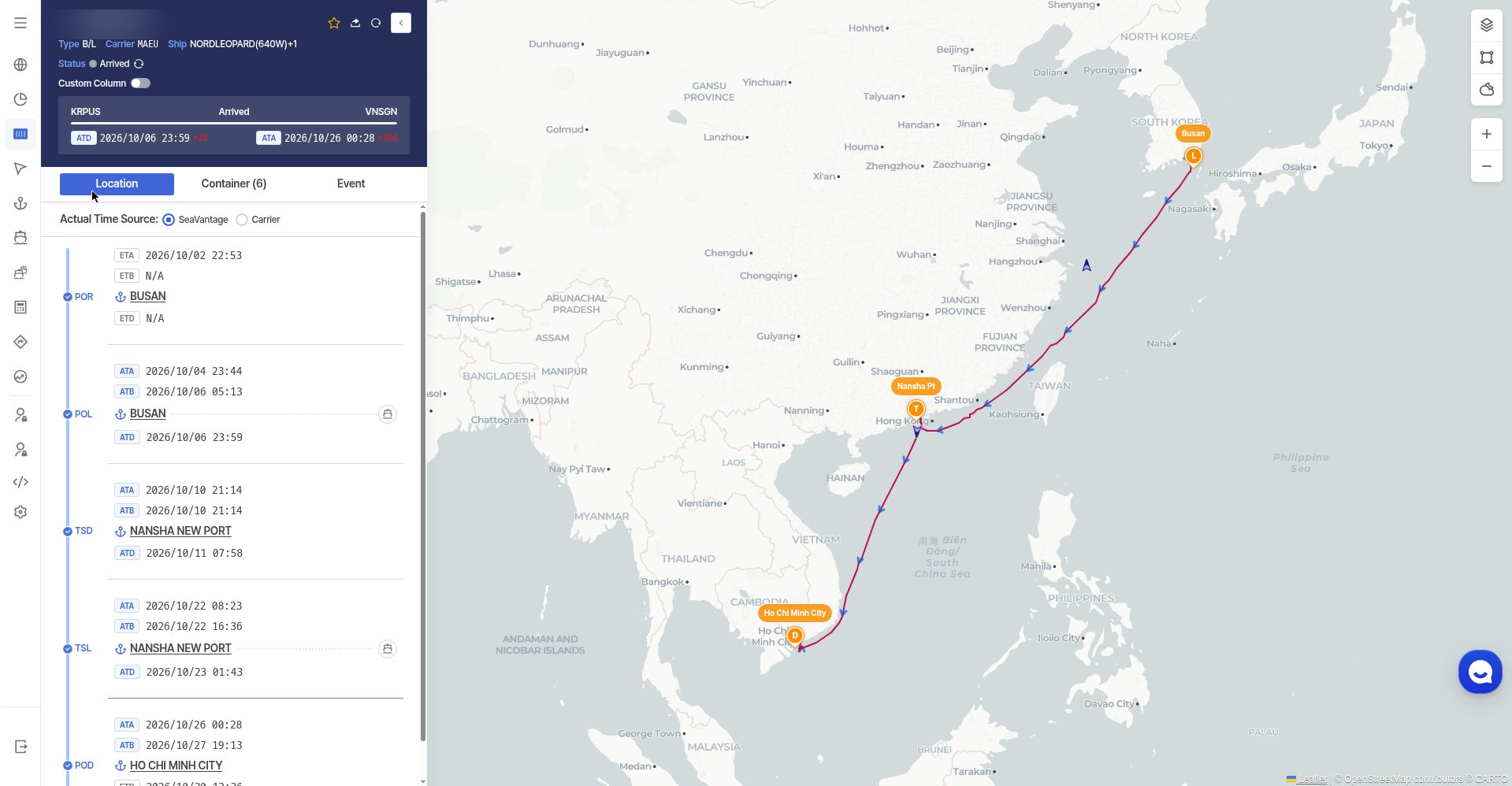
Embedded tracking view — the actual screen, opened inside your system
This is not a mock-up. It is the actual Cargo Insight screen for the same sample shipment — Maersk, vessel NORDLEOPARD (640W), Busan → Nansha → Ho Chi Minh City — on its Location tab.
Left — shipment milestonesRight — route mapTop — ATD Busan · ATA Ho Chi Minh City
Actual screen, captured 16 Nov 2026 from Cargo Insight (Location tab). Milestones on the left — POR / POL Busan, transshipment at Nansha New Port, POD Ho Chi Minh City — and the route map on the right. The B/L number in the header is blurred for sharing; vessel name, ports and times stay visible. This shipment has since arrived (ATD Busan 6 Oct, 23:59 · ATA Ho Chi Minh City 26 Oct, 00:28), so the live screen reads Arrived — the API sample earlier on this page is an earlier snapshot of the same shipment, taken before departure.
This is screen embedding. Your team clicked a shipment number in your system. This SeaVantage screen opened inside it. Close it and they are back in your system — they never left.
The Cargo Insight API is the connection that carries container tracking data from SeaVantage into your own system. It tracks shipments by bill of lading, booking, or container number across carriers for B/L and booking lookups, and container-number lookups. Your team sees the data on your own screens instead of logging into a second website.
2. How does Cargo Insight API integration work?
SeaVantage issues your API credentials, and your developer authorizes them once in Swagger. Your system registers shipments with POST /cargo/bulk, tracks them with GET /cargo/search, and sets alerts with POST /alert/cargo. From there, route, vessel, ETA, and events flow into your ERP, portal, or dashboard.
3. What data does the Cargo Insight API return?
For each shipment, the API returns the carrier, vessel name, voyage, and IMO number; the route with loading, transshipment, and discharge ports; carrier ETD and ETA; and the full event history. It also returns SeaVantage's PTA, a predicted arrival shown alongside the carrier ETA as an additional planning signal, not a replacement. The sample in this guide shows one Maersk shipment: Busan → Nansha → Ho Chi Minh City, six 20ft containers.
4. What is screen embedding, and how is it different from the API?
Screen embedding shows a live SeaVantage screen inside your own system. Click a shipment number and the tracking page opens, milestones on the left and route map on the right. The API moves the data into your screens; embedding shows SeaVantage's screen in yours. It works for shipments registered in your Cargo Insight workspace, and needs no custom code: issue a token, build the URL, paste it in an iframe. Tokens last 24 hours and only the two most recent stay valid, so renew about every 12 hours.
5. Do I need a developer to use Cargo Insight in my own system?
For the API, yes — once, to build the connection. For screen embedding, no — anyone who can paste an iframe can set it up. This guide is written for the people who approve the project, not just the people who build it.
6. How do I get access to the Cargo Insight API?
Start with the 7-day free trial. It applies automatically when you create a workspace and covers up to 10 bills of lading for Cargo Insight. API credentials come from SeaVantage once your trial or account is set up.
See how the SeaVantage Cargo Insight API puts container tracking in your own system — JSON to dashboard, plus screen embedding. A visual guide, no code needed.